Exempting Identities


© 2025 Sonrai Security. All rights reserved.
Exempted Identities Management
Sonrai's Cloud Permissions Firewall (CPF) includes a powerful feature for managing identity exemptions from CPF protections. This feature is designed to help administrators define explicit rules around which identities (IAM or SSO) are excluded from specific enforcement controls, ensuring operational continuity for critical users while maintaining strong security postures.
What Are Exempted Identities?
Exempted identities are IAM users, IAM roles, or SSO users that are deliberately excluded from one or more types of CPF protections. This helps ensure essential access and workflows continue uninterrupted—especially for breakglass accounts, automated scanners, or infrequently used but critical roles (e.g. swatters).
These exemptions apply conditionally within CPF's enforcement policies and are managed centrally in the Sonrai platform.
Supported Exemption Types
| Exemption Type | Description | Applicable To |
|---|---|---|
| Disabled Regions | Identity bypasses regional block enforcement | IAM Users, IAM Roles, SSO Users |
| Disabled Services | Identity bypasses blocked service enforcement (NOT protected services) | IAM Users, IAM Roles, SSO Users |
| Protected Services | Identity is not restricted by CPF-protected services policies | IAM Users, IAM Roles, SSO Users |
| Zombie Detection | Identity is never flagged as a "Zombie" (unused, aged identity) | IAM Users, IAM Roles |
| Just-in-Time (JIT) | Identity is exempt from just-in-time approval flows | SSO Users only |
| Firewall Tampering Protections | Identity is exempt from CPF's firewall protection hardening mechanisms | IAM Users, IAM Roles, SSO Users |
Protected Services and Service Blocks are distinct with each having its own exemption control.
The "Firewall Tampering Protections" exemption can only be configured at the top level of the AWS Organization. It cannot be applied at the OU or individual account level.
How to Configure Identity Exemptions
To assign an exemption, administrators can navigate to Exempt at Scope which is accessible via the menu on the Firewall Services panel of the UI.
Exemption Settings Interface
Steps:
- Select the type of user/role that will receive the exemption, either IAM Users and Roles or Single Sign-On Users.
- Click Add to add a new exempted identity (or identity pattern).
- Specify who the exception applies to, based on the type or user/role.
- IAM Users and Roles require an ARN pattern (learn about accepted patterns).
- Single Sign-On Users should be selected from the available list.
- Choose one or more exemptions to apply, as needed. For example, you may exempt an identity from Disabled Regions, Disabled Services, Protected Services, Firewall Tampering Protections, Zombie Detection, or Just-in-Time (JIT) approval flows.
- Click Add to register the exemption.
ARN Patterns and Wildcards
If no wildcards are used in the ARN pattern, then only IAM Users and Roles that match the full (case-sensitive) ARN provided will be granted an exemption. However, it may be more efficient to use wildcard characters when creating exemptions:
?for single-character match*for multi-character match
Mulitple wildcard characters can be added, anywhere in the pattern string, to create various effects. Use * to match multiple characters, allowing you to focus on the details that matter most. Use ? to match any single character, which can help avoid case-related issues in some scenarios.
One example use of wildcards that Sonrai uses is the following exemption: *e/stacksets-exec-*. This pattern matches all IAM roles that start with "stacksets-exec-", allowing any suffix to be included. The table below showcases some other use case examples.
| Use Case | ARN Pattern | Comments |
|---|---|---|
| Specific IAM role | arn:aws:iam::123456789012:role/MyExactRoleName | Only matches the specific role name in the specified account |
| Specific IAM role, more efficient | *:role/MyExactRoleName | Because account is known by CPF, we don't need to specify those details |
| Match IAM roles with a prefix | *:role/AppTeam-* | Matching roles include: "AppTeam-Reader", "AppTeam-Admin" |
| Match roles ending with a suffix | *:role/*-svc | Matching roles include: "web-svc", "billing-svc" |
| Match roles with multi-part names | *:role/Team-*-Role | Matching roles include: "Team-Backend-Role", "Team-Data-Role" |
| Match single-character variants, ignoring case | *:role/App?eam-? | Matching roles include: "Appteam-A", "AppTeam-b" |
Why does efficiency matter, when creating exemptions?
Although it might seem like saving a few characters doesn't matter, AWS offers a limited amount of space in SCPs where you can define and deploy controls to protect your cloud organization. Using wildcards to reduce the number of exemptions created and the number of characters used will ensure you have space available when you need it!
Managing Exempted Identities
All currently exempted identities across the organization can be viewed under Exempt at Scope which is accessible via the menu on the Firewall Services panel of the UI.
Exempted Identities Overview
This view displays:
- Identity patterns (wildcard-supported)
- Scope (e.g., organizational unit or account)
- Exemption Type (e.g., Protected Service)
- Edit/delete actions for each exemption
Use the Export button to download a full list of exempted identities and roles across your organization.
Revoking Exemptions Automatically
While creating exemptions can be an important – often necessary – tool for your cloud operations, a common issue with management involves knowing when an exemption is no longer needed, and when it should be removed. Leaving identities with unneeded exemptions in your organization can create an additional threat vector, if those identities were ever compromised.
Don't worry: Sonrai can help! By selecting the Automatically Revoke Exemptions option under your Settings menu, you can be confident that unused exemptions will be automatically revoked when found, if they weren't needed for the number of days specified. This simple setting ensures that exemptions remain in your system only when justified.
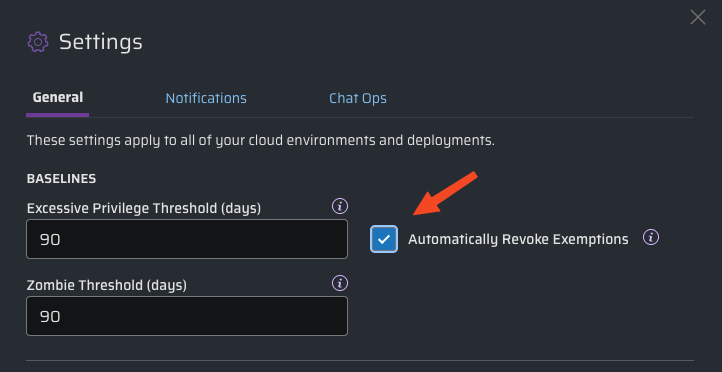
Although the default threshold when looking for unused exemptions is 90 days, you can configure the Excessive Privilege Threshold to whatever value best fits your security model.
Notification of Automated Changes
When exemptions are removed automatically, it's important that you are notified of the change; nobody likes surprises. So anytime Sonrai makes an automated change to your exempted identities, we send notifications to:
- all approvers at the scope where the exemption was applied
- any shared Chat Ops channels that are subscribed to changes at this scope
- the affected identity (only if human; non-human identities aren't notified)
"The exemption for identity {user_name} on {service} in {account} has been revoked due to {90} days of inactivity. For more information on auto revocation of unused privileged exemptions, click here."
Additional Considerations
Q: After turning on this feature, how long before exemptions are checked and revoked?
A: It can take up to 24 hours before exemptions are affected. (Sonrai checks for unused exemptions once each night.)
Q: Does this feature apply to all exemptions?
A: No. Global exemptions that are created for a user at root scope will not be automatically removed. This is by design.
Q: Why? Shouldn’t we remove excess permissions from all users and accounts when they aren’t being used?
A: Although removing exemptions helps to prevent overprivileged users in your cloud, there may be special cases when you don’t want permissions to be adjusted or removed automatically.
Consider the difference between these use cases:
- A developer is granted an exemption to an S3 bucket, but hasn't used that exemption in over 90 days. Removing the exemption makes sense; if that developer needs to access the same bucket later, getting access is just a Permission on Demand request away!
- An automated tool runs annually, and uses an identity with an exemption to support detailed audit processes. Even though this scheduled task is rarely used, you may not want to remove exemptions it requires.
- You configure a break-glass account to handle emergency access. Having exemptions removed here could leave you without the ability to react when needed!
Use Cases & Best Practices
Here are a few common scenarios and use cases where identity exemptions are especially useful:
1. Breakglass Identities
- Exempt From: All
- Purpose: Emergency access accounts; must remain functional even when most of the cloud is locked down.
- Risk Note: These accounts can access disabled services and regions—ensure they're audited and tightly controlled.
2. Security/Scanning Tools
- Exempt From: Disabled Regions, Disabled Services
- Purpose: SecOps and scanning tools require full visibility. Blocking these causes monitoring failures.
3. Swatters
- Exempt From: Zombie Classification
- Purpose: Rarely used but essential accounts. Should not be auto-flagged as dormant.
Summary
The Exempted Identities capability gives teams the flexibility to uphold business continuity while applying CPF protections precisely where needed. Administrators can now:
- Apply exemptions by identity or pattern.
- Choose specific exemption types aligned with use cases.
- View and manage organization-wide exemptions via a streamlined UI.
For more information on best practices or bulk management of exemptions, please refer to Sonrai’s CPF admin guide or contact your Sonrai support team.