Hero Card: Threat Vectors

© 2026 Sonrai Security. All rights reserved.
Overview

The Threat Vector Dashboard provides a permissions-based visualization that maps cloud identities to high-impact threat categories. It helps CISOs and security teams understand who could do what if compromised, before a breach occurs.
Built on Sonrai's permission graph and integrated with Cloud Permission Firewall (CPF), the dashboard makes it easy to identify and remediate privileged access paths that could enable critical attack techniques.
Threat Vectors covers AWS and GCP. On a GCP scope the dashboard reads Projects wherever an AWS scope reads Accounts; the threat categories themselves are the same for both. Threat Vectors is not available for Azure scopes.
Why It Matters
Modern cloud environments contain thousands of identities and permissions. While individual permissions may appear harmless, certain combinations can enable high-impact attack paths such as:
- Disabling audit logging
- Exfiltrating secrets
- Launching unauthorized compute infrastructure
- Encrypting or deleting critical data
The Threat Vector Dashboard groups these risks into clearly defined threat categories so teams can quickly assess exposure and reduce blast radius.
How It Works
The dashboard uses Sonrai's permission graph and pre-breach threat modeling to:
- Map identities to privileged permissions
- Associate those permissions with defined threat categories
- Display which identities across which accounts could execute specific attack techniques
- Enable rapid remediation through Cloud Permission Firewall
This is a pre-breach exposure view - focused on identifying possible access paths, not runtime behavior.
The Threat Vector Dashboard intentionally focused on exposure visibility. It does not provide:
- Risk scoring or prioritization
- Behavioral detection or runtime alerts
- Automatic remediation
- Time-series or historical trend analysis
Who Is This Feature For?
- Cloud Security Engineers – Rapid visibility into exposure across accounts
- SOC Analysts – Faster triage and investigation of potential attack paths
- Security Architects – Validate safer defaults and reduce blast radius
- CISOs & Security Leaders – Assurance that high-impact access paths are controlled
Dashboard Overview
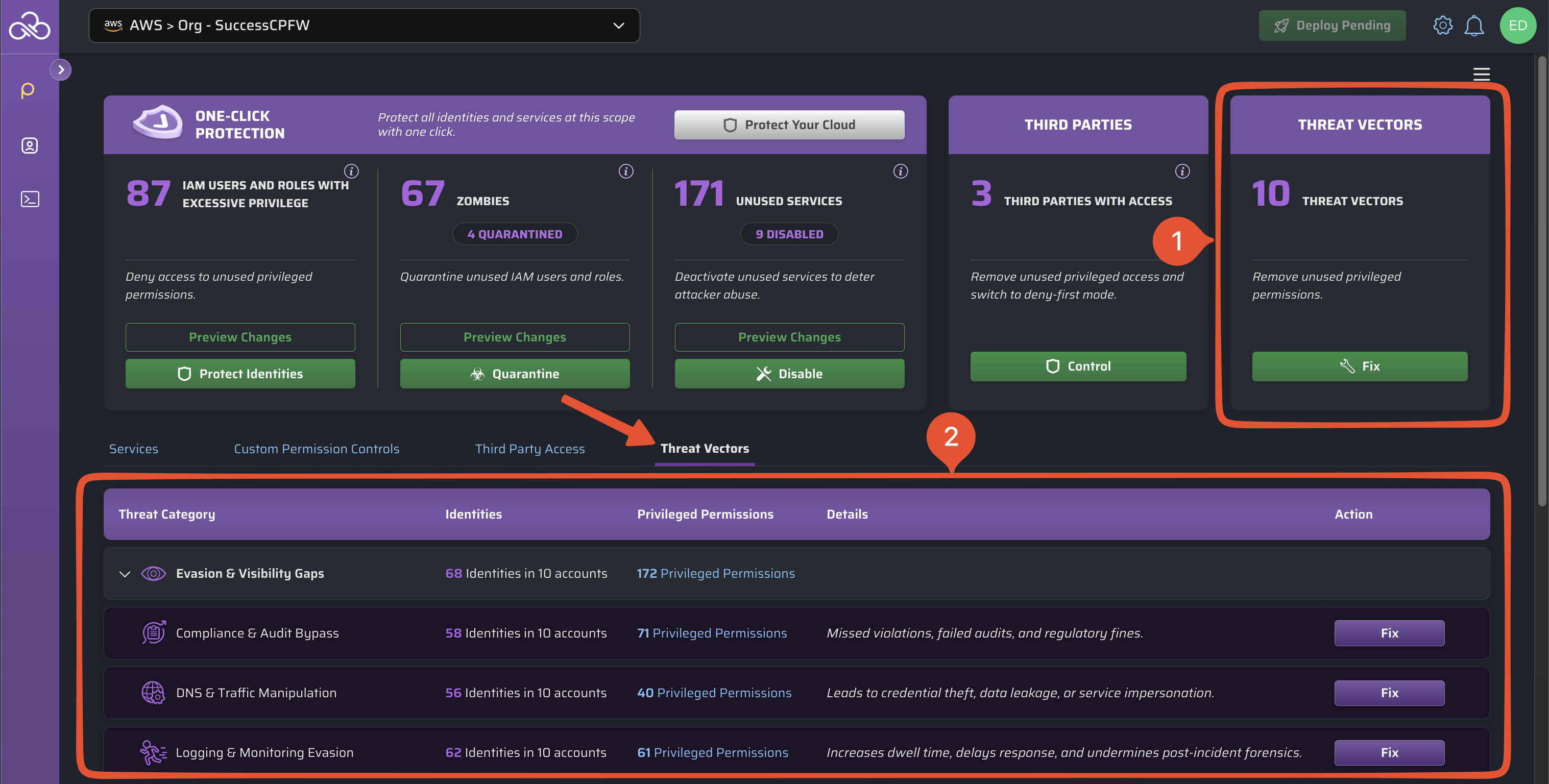
Information about potential threat vectors is provided in two locations:
1: Threat Vectors Hero Card
The Threat Vectors Hero Card provides immediate visibility into overall threat posture across the current scope.
This Hero Card includes:
- The total number of threat categories (out of 10) with outstanding exposure.
- A button to open the threat vectors table, where you can take remediation steps.
2: Threat Vectors Table
This table groups threat vectors into four types of risk, and ten total threat categories.
- See accounts and identities with unused privileged permissions that could put your cloud at risk.
- Get a short description of what type of threat is posed.
- Use the convenient button to add controls that protect unneeded permissions.
Understanding Threat Categories
| Threat Type | Threat Category | Description |
|---|---|---|
| Evasion & Visibility Gaps | Compliance & Audit Bypass | Missed violations, failed audits, regulatory fines. AWS: disabling Config, deleting CloudTrail. GCP: updating Binary Authorization policy, deleting Artifact Registry rules. |
| DNS & Traffic Manipulation | Credential theft, data leakage, service impersonation. AWS: modifying Route 53 or VPC routing. GCP: retargeting Cloud Load Balancing forwarding rules. | |
| Logging & Monitoring Evasion | Increased dwell time, delayed response, weakened forensics. AWS: disabling metrics, deleting logs. GCP: deleting packet mirroring, lowering the Cloud Armor tier. | |
| Impact & Disruption | Compute Infrastructure Hijacking | Unapproved compute usage, cloud cost spikes, abuse of trusted IP space. AWS: launching EC2 instances for cryptomining. GCP: creating or updating Cloud Functions, creating Cloud Routers. |
| Data Destruction & Ransomware | Operational downtime, extortion, irreversible data loss. AWS: encrypting or deleting storage. GCP: re-encrypting Cloud SQL instances, altering Backup and DR backups. | |
| Initial Access & Entry Points | Identity Takeover & Privilege Escalation | Expanded attacker access and lateral movement. AWS: AssumeRole abuse, modifying groups. GCP: setting IAM policy on resources, approving Access Approval requests. |
| Secrets & Credentials Theft | Impersonation of trusted services and persistent access. AWS: reading Secrets Manager or SSM secrets. GCP: creating API keys or Cloud KMS key versions. | |
| Persistence & Movement | Cross-Account Resource Exposure | Unauthorized access to production or financial systems. GCP: enabling Shared VPC hosts, updating backend buckets. |
| Execution & Command Control | Automated lateral movement or sabotage. AWS: Lambda injection, SSM RunCommand. GCP: instantiating Dataproc workflow templates, creating Cloud Run worker pools. | |
| Network Security Bypass | Exposure of internal systems. AWS: modifying NACLs or security groups. GCP: updating or deleting VPC firewall rules. |
Investigating Exposure
Click a Threat Category in the table (for example, Compliance & Audit Bypass) to review every account where identities have access to privileged permissions related to this threat vector. On a GCP scope this panel groups by Project instead of Account.
You can then expand an entry to see:
- Identities inside it that have access to privileged permissions
- The number of privileged permissions they have access to
Select the Privileged Permissions count on any row to open the full list of permissions behind that threat vector. Each permission is listed with the MITRE Tactic it maps to — for example Privilege Escalation, Defense Impairment or Credential Access — and both columns can be filtered.
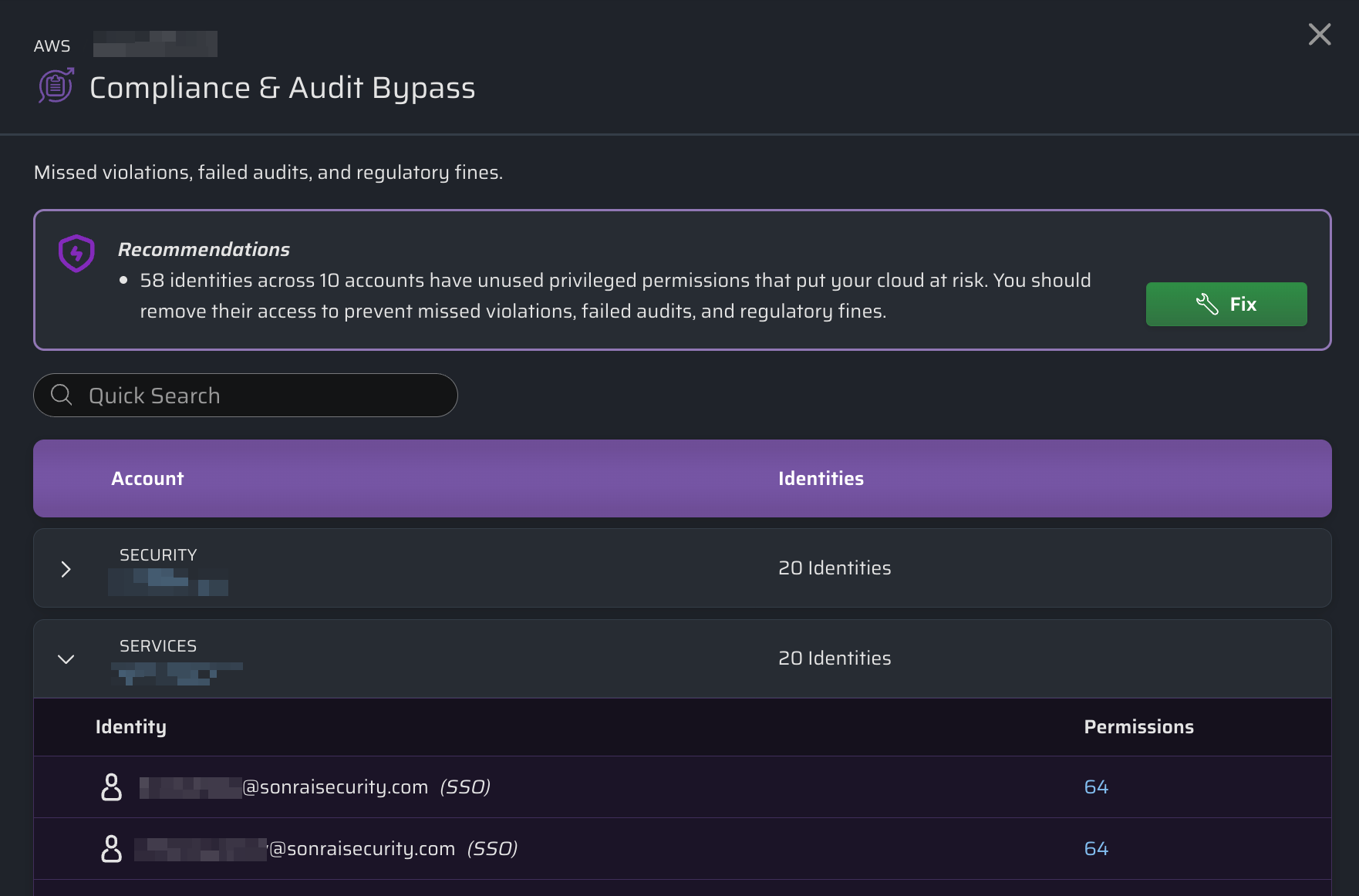
This view allows your teams to quickly understand blast radius and prioritize remediation.
Remediation Workflow
Now that you've got insight into potential threat vectors that should be secured, what are the next steps? How can you protect your organiation before a problem occurs?
In addition to adding other service controls in CPF, you can use the Threat Vectors Dashboard to immediately protect services across accounts and remove access to unused privileged permissions.
All you need to do is click in a row from the Threat Vector Table, or while viewing a detailed summary of an individual Threat Category.
CPF will proceed to:
- Identify unused privileged permissions
- Stage protections for affected services
- Remove unused privileged permission access
The first time you perform this action, a confirmation window will show details of what changes are going to be staged. Select the Do not show me this again box if you prefer to immediately stage changes in the future.
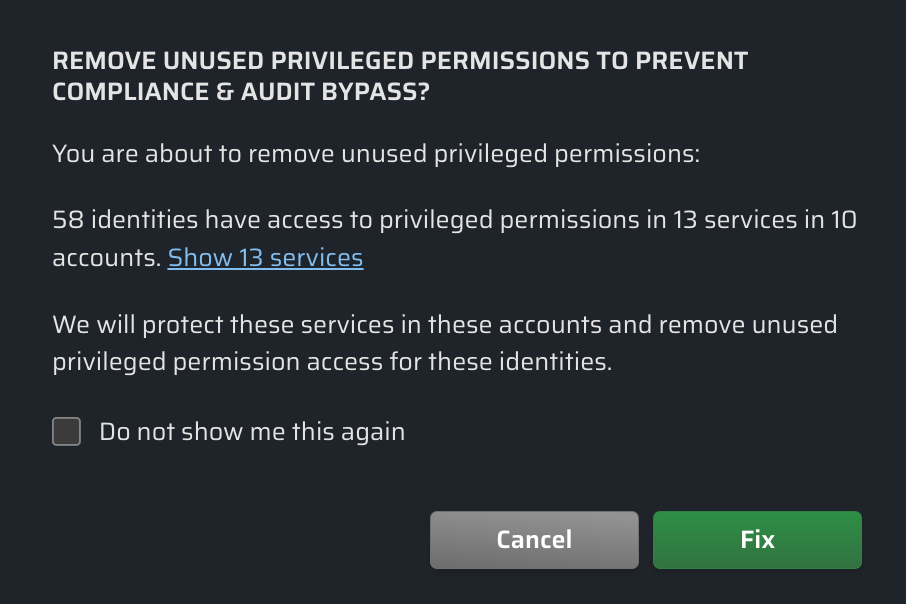
All proposed changes are then staged as Pending Changes that can be reviewed and applied through standard CPF workflows.